As many others, I am selfhosting a lof of software (a hobby I can seriously recommend). One of the low-hanging fruit to host is a VPN. For no extra cost you get the benefits of a VPN - encryption and thus privacy, sometimes circumventing geo-blocking - and you own the total tech stack. One of the simplest implementations and the one I use is wg-easy . I can highly recommend it.
Why am I monitoring#
As the list of your selfhosted-services grow, it becomes important to monitor them. Like your plants in your house, they need some care and the occasional check-up. But unlike plants, they are less visible and when things go wrong it is not immedeatly obvious. To make your life easy, there are tools that can check on your things regularly, and report if something is not looking right. The most popular choice among selfhosting people is (uptime-kuma)[https://github.com/louislam/uptime-kuma]. For most services, you just past in a URL, and Uptime Kuma checks regularly if something is responding.
It is tricky to monitor Wireguard#
As Wireguard is not a website, checking it’s health is not so straightforward. One approach I used is to just check if the admin UI website is accessible. Problem is, I have had my VPN users complain that the VPN was not working properly, while the UI was still accessible. So how to monitor better?
Monitoring the last handshakes#
I am certain this is not the best method out there, but a conversation with AI has lead me to the following idea. Running wg show wg0 latest-handshakes inside the wireguard container, you get the timestamp of the latest handshakes of the wireguard peers measured in seconds.
Usually Uptime Kuma is checking on a service on itself by regularly (polling), but it is also possible to do the opposite: A monitor type called push. Here the service needs to send something to a URL defined by Uptime Kuma in a defined timeframe, otherwise something is wrong. A bit like a dead persons switch.
This lead me to writing this little script together with AI:
#!/bin/bash
THRESHOLD=180  # seconds

# Container check
STATE=$(docker inspect -f '{{.State.Running}}' wg-easy 2>/dev/null)

# Get the most recent (youngest) handshake timestamp across all peers
YOUNGEST=$(docker exec wg-easy wg show wg0 latest-handshakes 2>/dev/null | awk '{print $2}' | sort -n | tail -1)

NOW=$(date +%s)
AGE=$((NOW - YOUNGEST))

if [ "$STATE" = "true" ] && [ -n "$YOUNGEST" ] && [ "$YOUNGEST" -gt 0 ] && [ $((NOW - YOUNGEST)) -lt "$THRESHOLD" ]; then
  # echo $AGE
  curl -fsS "https://monitor.tld/api/push/xxxxxxxxxx?status=up&msg=Young_${AGE}s_ago&ping=${AGE}" > /dev/null
elif [ "$STATE" = "true" ] && [ -n "$YOUNGEST" ] && [ "$YOUNGEST" -gt 0 ] && [ $((NOW - YOUNGEST)) -gt "$THRESHOLD" ]; then
  curl -fsS "https://monitor.tld/api/push/xxxxxxxxxx?status=up&msg=Old_${AGE}s_ago&ping=${AGE}" > /dev/null
else
  curl -fsS "https://monitor.tld/api/push/xxxxxxxxxx?status=down&msg=container_down" > /dev/null
fi
This checks first if the container is running. Then it checks via the command mentioned above when the latest handshakes have been. If there are multiple peers, it takes the youngest handshake of them all. Depending on these two datapoints, a push message is released to Uptime Kuma. When the server has issues or the container is down, Uptime Kuma will flag the service as down. Otherwise, when the container is running, the service is marked as up and the time since the last handshake is transferred as ping. This way, I can see in the graph of Uptime Kuma roughly the activity of the VPN:
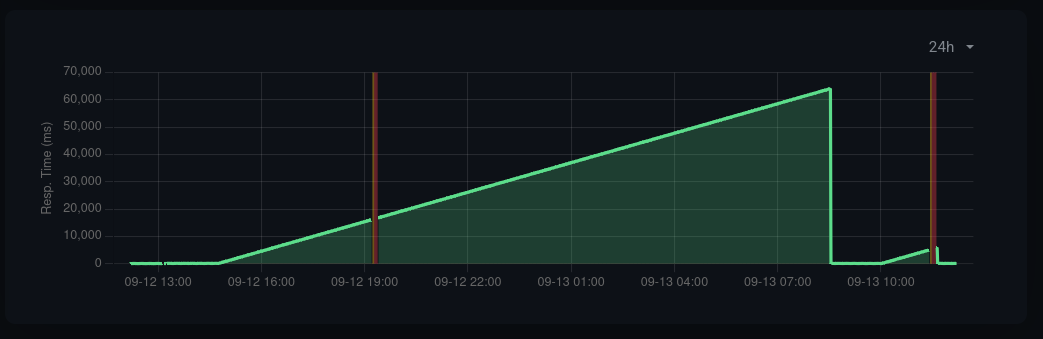
Here one of my VPNs had issues two times (red No heartbeat in the time window), and the rising green curve is the time since the last handshake. In other words, in the morning of the 13th of September, someone connected to it again.
Here another example of a more active VPN.
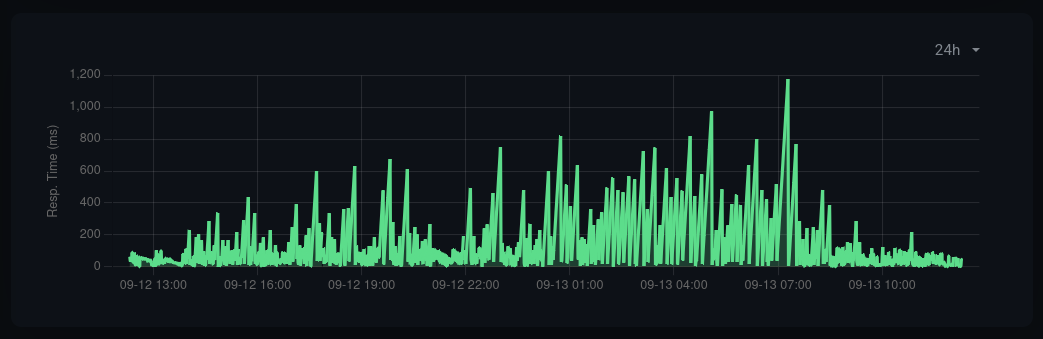
Here you can see that the container seemed to be running fine and most of the time peers were connected, but many times the handshakes have been longer than 180s ago.
I am sure there are better options out there. E.g. I would love to monitor my VPNs based on Uptime Kuma pinging some service through a wireguard tunnel. But this will be for another day :) Hope this helps someone!